Product preview. Forecasts, web and mobile apps, and audio are preview experiences. Access is by invitation.

Features

Everything you use to read the market, in one workspace.

From the index ribbon to the tax report, ChanakyaTrade is a full market workspace for India, with forecasts and World Watch built in. The same on the web, Android and iPhone.

Markets and charts
The whole market at a glance, and a pro chart when you need it.

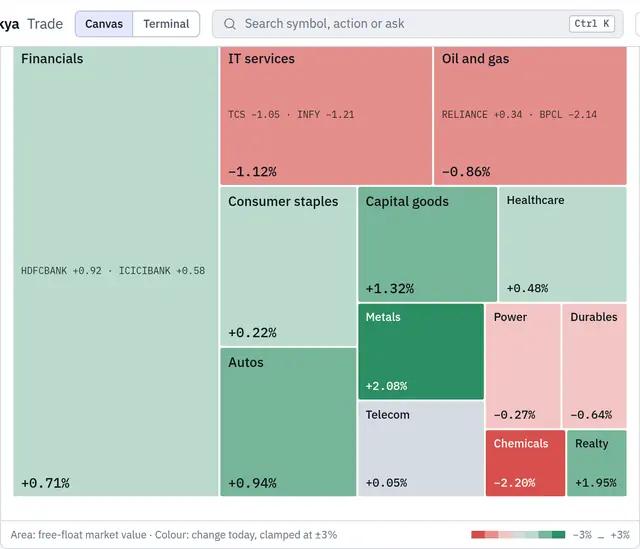
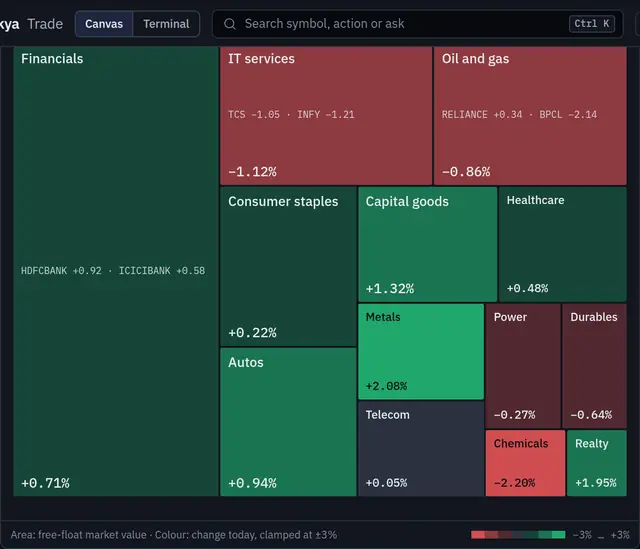
  • Market home: index ribbon with the platform’s own composites, breadth, market mood, sector heatmap, top movers, foreign portfolio flows, market volatility, the overnight board, session clock and holidays.
  • Stock pages: quote, fundamentals and statements, peers, ownership, deals and delivery, ETF pages, and the surveillance passport.
  • Pro charts: six chart types, indicators, at least 18 drawing tools, multi-chart layouts, saved templates, events and the forecast cone on the chart, adjusted prices with session shading, alerts and orders from the chart, export.
  • Watchlists: sections, columns including the forecast, colour link groups, bulk import, ready-made lists, sync across devices.
  • News, filings and calendars: a news wall with headline and link, filings, result cards, results, economic, corporate-action, holiday and IPO calendars, deals and regulator feeds, and a document library for each company.
Sector heatmap with every cell showing its signed changeSector heatmap with every cell showing its signed change
Sample dataThe securities quoted are for illustration only and are not recommendatory.

Forecasts

A chance, a range and the reasons, for every listed stock.

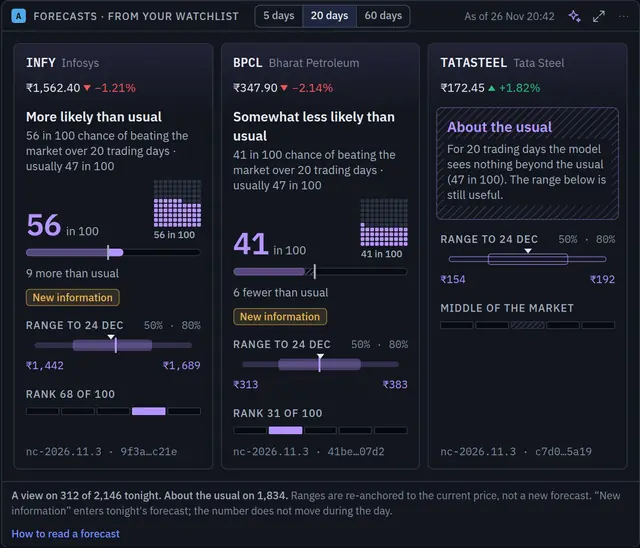
  • Forecast card for 5, 20 and 60 trading days: the chance of beating the market beside the usual chance, 50% and 80% ranges, rank, confidence, as-of time and model version.
  • 100 Futures, the fan chart, the five drivers and the risk flags.
  • “About the usual”, said plainly, a reason whenever there is no view, and an honesty counter on the home page.
  • Index and sector forecasts, a sortable forecast board, the regime strip.
  • Seal and Verify, the revision trail, the forecast label, the naive twin and the net-of-costs view.
  • Live range position during market hours, and a badge when new information lands; the chance itself changes only at the nightly run.

How each one works

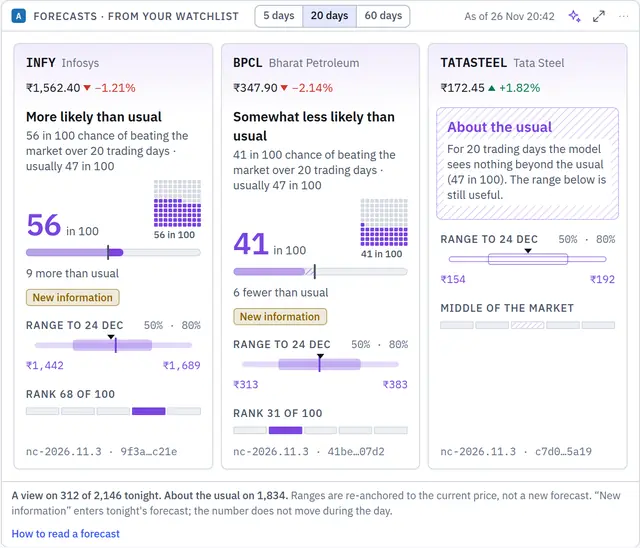
Forecast cards for INFY, BPCL and TATASTEEL: more likely than usual, somewhat less likely than usual, and about the usualForecast cards for INFY, BPCL and TATASTEEL: more likely than usual, somewhat less likely than usual, and about the usual
Sample dataThe securities quoted are for illustration only and are not recommendatory.

World Watch

News and events as an input to the forecast.

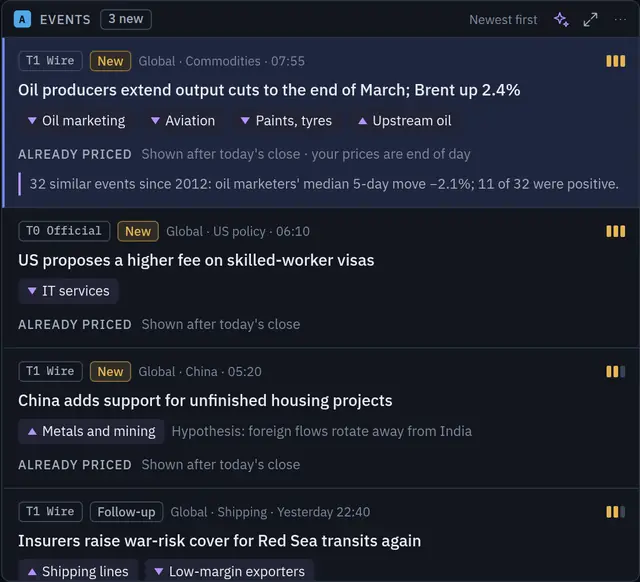
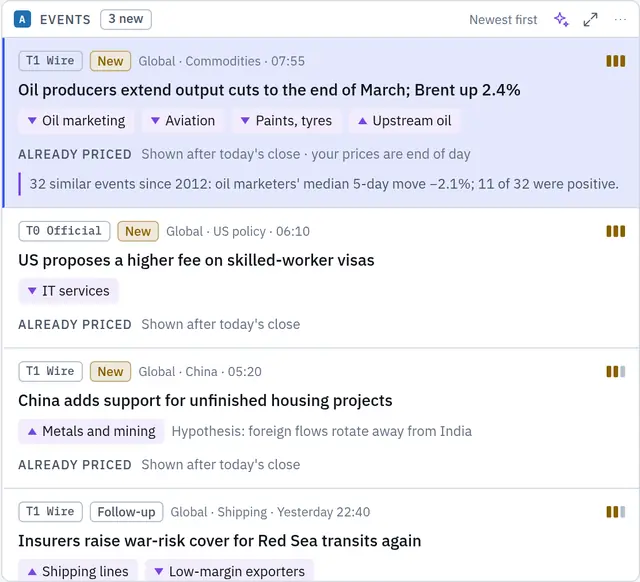
  • Event feed and cards for India and the world, with source tier, novelty and materiality.
  • Impact chains from event to factor to sector to stock, each link with its source.
  • Exposure facts on every stock page, measured from prices with their period, and a library of tested macro chains: crude, rupee, repo rate, US yields, monsoon, GST, tariffs and more.
  • Similar past events, already priced, what the news changed, why it moved and a scenario lab.
  • Scheduled events radar, the results cockpit, and which of your stocks an event touches.
The World Watch feed with tier, novelty and materiality on each eventThe World Watch feed with tier, novelty and materiality on each event
Sample dataThe securities quoted are for illustration only and are not recommendatory.

AI copilot

Ask in plain words. Get an answer with its sources.

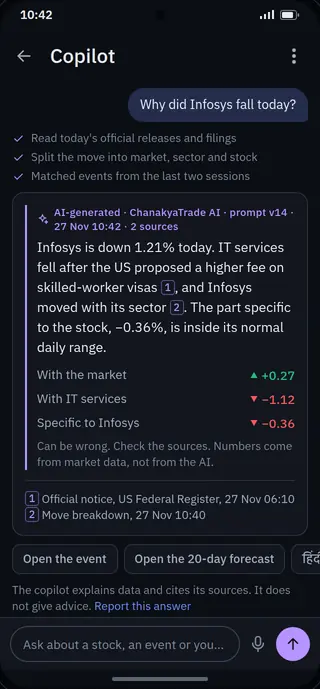
  • A docked copilot that shows what it is doing, then answers with citations you can open.
  • Explain this on every widget, stock narratives, concall summaries and questions on annual reports.
  • Morning Edition in text and audio, English and Hindi.
  • Promise Ledger, Tip Check and Thesis Guard.

Every AI feature

The copilot on Android explaining a move with cited sourcesThe copilot on Android explaining a move with cited sources

Screeners and alerts

Find what you are looking for, and hear about it when it happens.

Screeners

  • Presets, saved screens and actions on the results
  • Forecast columns and filters
  • Event and filing filters, and your holdings flagged
  • Write a screen in words

Alerts

  • Price, percentage, volume, open interest and indicator alerts
  • Event, filing, forecast-change and portfolio alerts, and reminders for scheduled events
  • Rules and templates, at least 500 alerts each
  • Write an alert in words and replay it on past data before you save it

Portfolio and reports

Your holdings, understood.

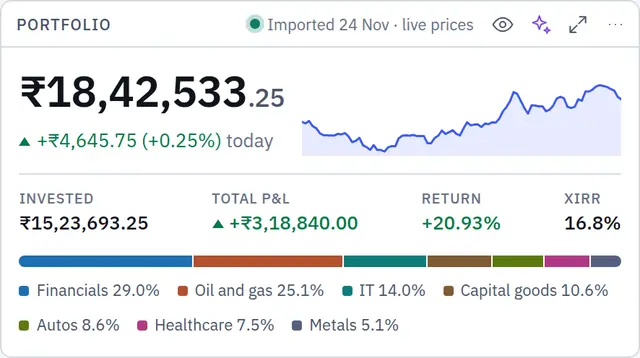
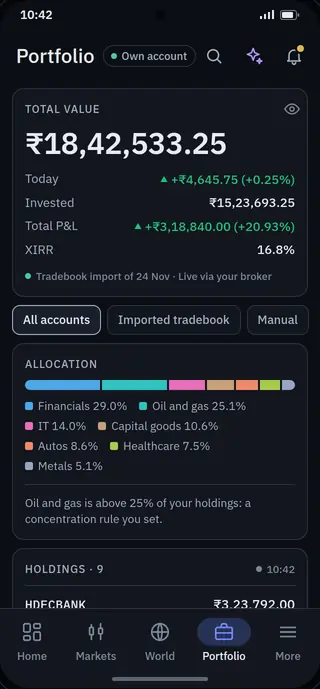
  • Holdings from a linked broker or from imports: broker files, the consolidated account statement, manual mapping, undoable batches.
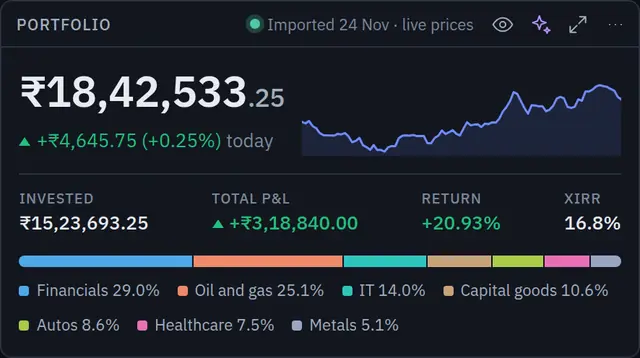
  • Summary, allocation and X-ray, risk meter, drawdown against a benchmark, dividends, true P&L, concentration facts and flagged holdings.
  • Forecasts for your holdings, Thesis Guard and a trade journal.
  • Reports: P&L, tax P&L, tradebook, forecast report, stock one-pager and a portfolio report, exported to PDF, XLSX or CSV.
  • Your data is yours: export all of it at any time.
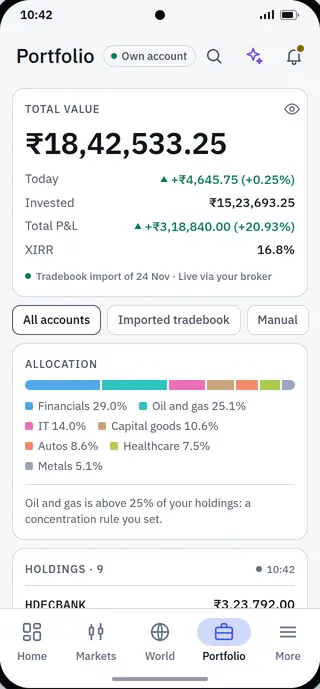
Portfolio summary with value, P&L, XIRR and allocation by sectorPortfolio summary with value, P&L, XIRR and allocation by sector
Sample dataThe securities quoted are for illustration only and are not recommendatory.

Trading through your broker

Prepare here. Confirm in your broker’s own ticket.

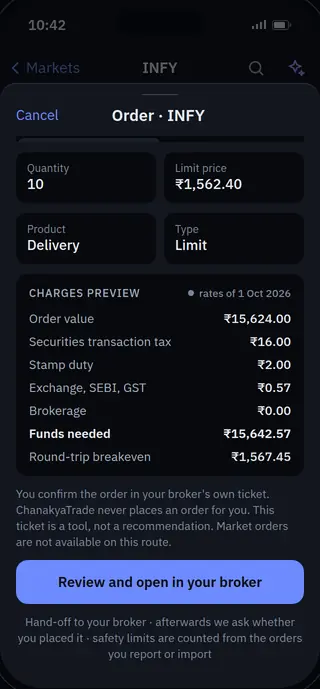
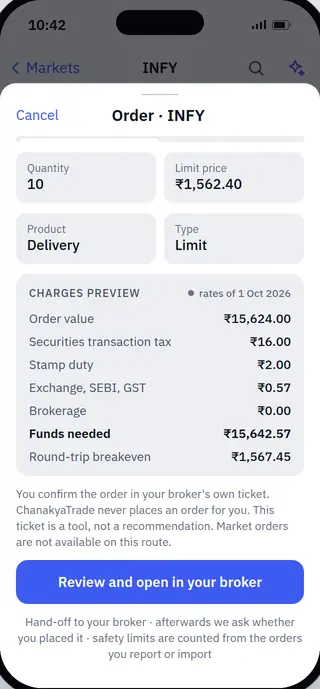
  • Order ticket checked against tick size, lot size and price band, with every charge shown before you send it.
  • Hand-off of single orders and baskets to your broker’s own order page, where you confirm.
  • Orders, positions, trades and funds where your broker allows a linked view; your own record where it does not.
  • Your own limits: daily loss, trades a day, order size, time windows, and a one-tap kill switch for the rest of the day.
  • Factual ticket warnings: surveillance stage and margin, thin trading, results due today, and the regulator’s risk disclosure before any F&O screen.
The order sheet on iPhone with the charges preview and the button to open it in your brokerThe order sheet on iPhone with the charges preview and the button to open it in your broker

Practice

Practise on the past, honestly.

  • Time Machine: pick a date at least 30 days old and the whole workspace rewinds with it: charts, news and filings as first seen, fundamentals as filed. Step forward a day at a time.
  • Honest fills: never better than real, with latency, depth and the charges of the day.
  • A practice journal kept apart from your real results, and never ranked against anyone.

On every practice screen

“Practice. Replayed market from {date}. No real orders are placed.” Practice results also carry: “Hypothetical. Based on past data for {period} against {benchmark}, after estimated costs. Past results do not predict future results.”

Dashboards and widgets
Calm by default. Dense by choice.

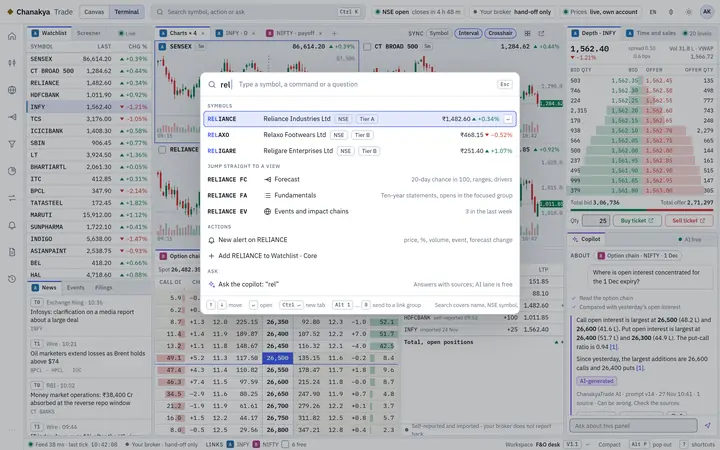
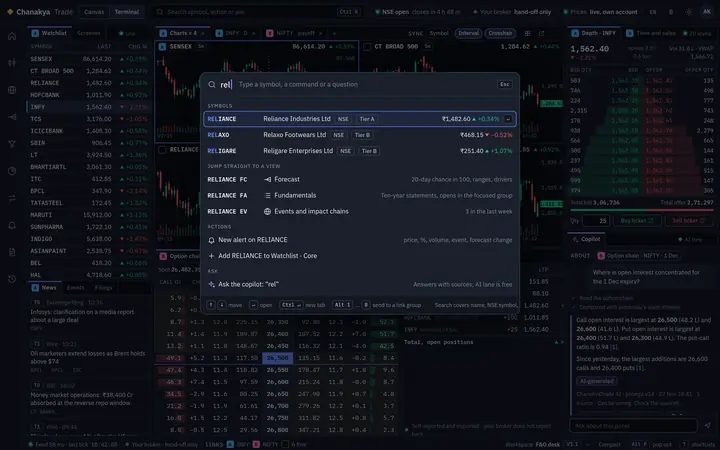
  • Two workspaces from one widget gallery: a calm Canvas and a dense Terminal with docking and pop-outs, with starter templates for investors, swing traders and traders.
  • Session Scenes: the workspace changes layout with the market phase, with a heads-up, a pin and one tap back to your own layout.
  • Describe a widget in words and get one, built from approved data and chart templates.
  • Link groups, a command palette, keyboard shortcuts, notes, calculators and layouts you can arrange without dragging.
The Terminal workspace: dense docked widgets with chart, watchlist and forecastThe Terminal workspace: dense docked widgets with chart, watchlist and forecast
Sample dataThe securities quoted are for illustration only and are not recommendatory.

Mobile extras

The same product, made for the phone.

  • Every feature on Android and iPhone, screen for screen.
  • Home-screen widgets for your watchlist, an index pair and market mood.
  • Fingerprint or face lock, a blurred app switcher, and the last-known state when you are offline.
  • Audio controls on the lock screen, deep links from notifications, and sharing a statement or a tip straight into the app.

The mobile apps

Portfolio on Android with total value, P&L and allocationPortfolio on Android with total value, P&L and allocation

Notifications

Fewer, truer notifications.

  • Push, in-app inbox and email, with channels by kind, quiet hours and a daily cap that groups a story into one message.
  • Delivery truth: each notification says when it was triggered and when it arrived; a late price alert says it is late.
  • Lock-screen privacy: the stock and the event, never a rupee amount from your portfolio.
  • Forecast notifications in one fixed form, with the seal and a disclosure link, and none for no-edge or unconfirmed items.
  • English or Hindi, as you choose.

Security

Secure by default, private by design.

Security and privacy in detail

  • Password plus a one-time code, short sessions with rotating refresh, a step-up check before sensitive actions.
  • Every device and session listed, with a notice when a new one signs in.
  • A privacy mode that hides every amount, an idle lock on the web, and a log of your own security events.
  • No broker password, PIN or TOTP secret is ever asked for or stored.

Coming next

What the next release adds.

Options workspaceOption chain, OI analytics, PCR and max pain, strategy builder and payoff, Greeks, implied volatility, expiry calendar, ban listComing next
TabletsLayouts for Android tablets and iPadComing next
Passkeys and authenticator appsComing next
Market depth and time and salesComing next
Track todayLive Activity on iPhone and Live Update on AndroidComing next
More charts15 chart types, 30 drawing tools, compare and ratio, bar replay, volume profile, pattern detection, 100+ indicatorsComing next
Beyond Indian stocks, for researchMutual funds, commodities, US stocks and bonds: facts, charts, screeners, watchlists and alerts. Research only: no investing and no ordersComing next
More screenersETF screener, fund comparison, screen rewind on past datesComing next
More reportsScheduled email reports, capital-gains schedule, advance-tax and loss-harvest views, charges reportComing next
More portfolio toolsMutual funds from a statement, allocation against a target, correlation, behaviour mirrorComing next